
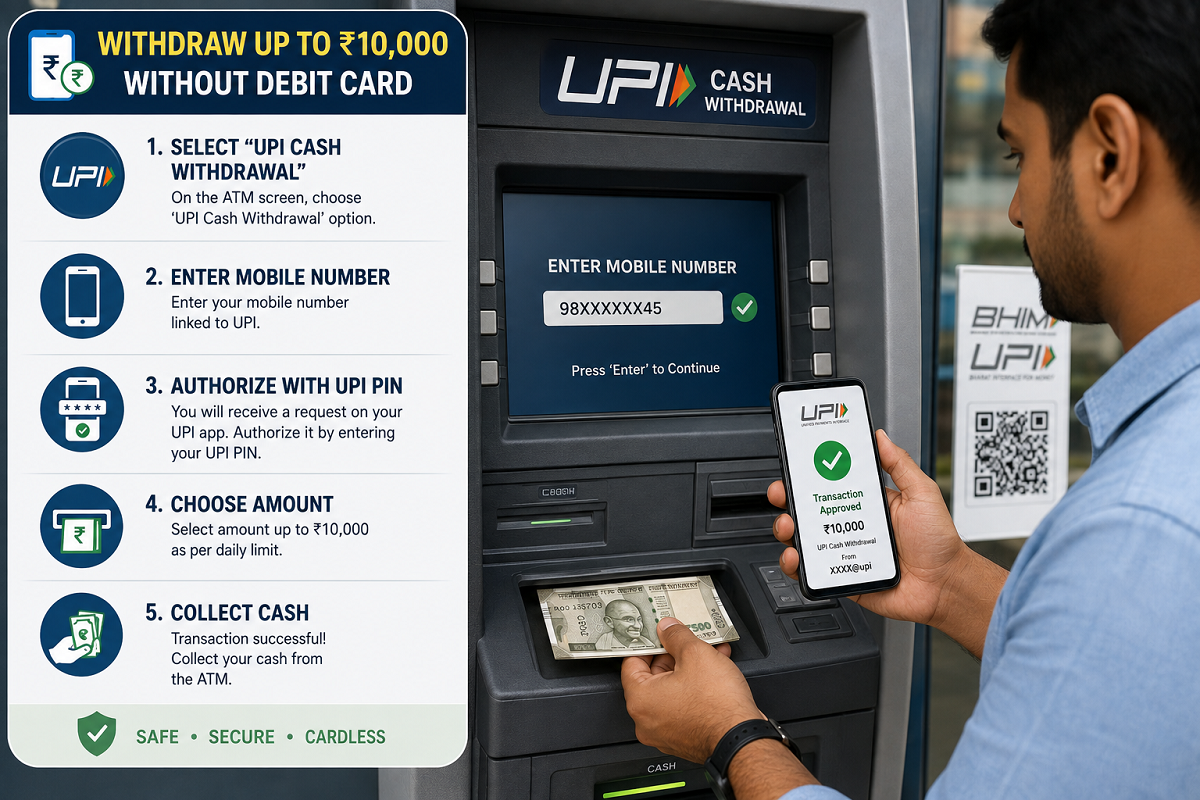
UPI ATM Cash Withdrawal: You no longer always need a physical debit card to take cash out of an ATM. At UPI-enabled ATMs, customers can use the Unified Payments Interface to withdraw money by scanning a QR code and authorising the transaction through a UPI app.
The facility is known as Interoperable Cardless Cash Withdrawal (ICCW) and is designed to make ATM transactions simpler while reducing dependence on physical cards. It can be particularly useful if you have forgotten your debit card, lost it, or recently opened a bank account and have not yet received a physical card.
The process is straightforward. You select the UPI withdrawal option at a supported ATM, enter the amount, scan the QR code displayed on the screen and approve the transaction using your UPI PIN. Once authentication is successful, the ATM dispenses the cash.
Here is how the process works and what users should know before trying it.
How to Withdraw Cash From an ATM Using UPI
The exact screen layout may differ across ATM operators, but the basic process is broadly similar.
First, visit an ATM that supports UPI-based cardless cash withdrawal. On the ATM screen, choose the option labelled UPI Withdrawal, UPI Cash Withdrawal or a similar cardless cash option.
Next, enter the amount you want to withdraw. The ATM will then generate a dynamic QR code for that particular transaction.
Open a UPI-enabled app on your smartphone and use its QR scanner to scan the code shown on the ATM screen.
After scanning, the app should display the withdrawal request and the amount. Select the bank account from which you want the money to be debited and authorise the transaction using your UPI PIN.
Once the transaction is successfully approved, the ATM will dispense the cash. A confirmation should also appear in your UPI app, while some ATMs may offer a printed receipt.
UPI ATM Withdrawal Process at a Glance
| Step | What You Need to Do |
|---|---|
| 1 | Select UPI/Cardless Cash Withdrawal on the ATM |
| 2 | Enter the amount to withdraw |
| 3 | Scan the dynamic QR code using a UPI app |
| 4 | Choose the linked bank account |
| 5 | Enter the UPI PIN on your phone |
| 6 | Collect cash after successful authentication |
The key difference from a traditional ATM transaction is that there is no need to insert or tap a debit card.
How Much Cash Can You Withdraw Through UPI ATM?
Under the ICCW framework, the withdrawal limit can be up to ₹10,000 per transaction.
However, the actual amount available to a customer may depend on the bank's own transaction limits as well as the applicable UPI and ATM rules.
The UPI-based withdrawal can also count towards the user's applicable daily transaction limits. Therefore, even if the ATM technically supports a ₹10,000 withdrawal, a lower limit may apply depending on the bank or account.
Users should check their bank's current rules if a transaction is declined despite sufficient account balance.
Why UPI ATM Withdrawal Can Be More Convenient
One of the biggest advantages is that the physical debit card is no longer essential for withdrawing cash.
If your card is at home, temporarily unavailable or still being issued by the bank, you may still be able to access cash through a supported UPI ATM.
The facility can also be useful for people who manage multiple bank accounts through a single UPI app. With a normal debit card, the withdrawal is tied to the account linked to that card. In a UPI ATM transaction, users may be able to choose from eligible bank accounts already linked with their UPI profile.
This makes the process more flexible.
It Can Reduce Card Skimming and Cloning Risk
Traditional ATM fraud can involve skimming devices or compromised card-reading equipment designed to capture card information.
UPI ATM withdrawal removes the need to insert the physical card, which can reduce exposure to certain card-related fraud risks.
The ATM also generates a dynamic QR code for the transaction rather than relying on a reusable static payment code.
However, cardless does not mean risk-free. Users still need to protect their UPI PIN and ensure they are using the genuine ATM screen and their own trusted UPI app.
Never Enter Your UPI PIN on the ATM Screen
This is one of the most important safety rules.
The UPI PIN should be entered only inside the authorised UPI app on your own phone. The ATM should not ask you to type the UPI PIN directly into the machine as part of a QR-based UPI withdrawal.
Never share your UPI PIN, OTP or mobile banking password with another person, including anyone claiming to be bank staff.
Also avoid accepting help from strangers while completing a cardless withdrawal.
What If Cash Is Not Dispensed but Money Is Debited?
Like other ATM transactions, a technical failure can sometimes occur.
If the transaction is shown as successful and the account is debited but the ATM does not dispense cash, do not attempt to resolve the issue by sharing credentials with anyone at the ATM.
Keep the transaction reference or confirmation available and report the failed transaction to the bank through its official customer-service channel.
The bank's applicable failed-transaction and reversal rules will determine how the amount is handled.
UPI ATM vs Traditional Cardless Cash Withdrawal
Cardless cash withdrawal existed even before UPI ATM integration, but older methods can involve more steps.
Depending on the bank, customers may have to initiate a cash-withdrawal request through internet or mobile banking, generate a code, enter an OTP or provide other transaction details at the ATM.
UPI-based withdrawal simplifies the process by using a QR code and the familiar UPI authentication system.
For people already comfortable with scanning QR codes for payments, the experience can therefore feel more intuitive.
You Still Need a Smartphone and Active UPI Setup
While no debit card is required, the service is not completely device-free.
You generally need a smartphone with internet access, a working UPI app and a bank account already linked to UPI.
If the phone has no network connectivity, the UPI app is not working, or the bank account is not properly linked, the withdrawal may not go through.
The ATM itself must also support UPI cash withdrawal. The feature may not be available at every ATM.
Check These Points Before Using UPI ATM
Before starting a withdrawal, make sure the ATM clearly offers a UPI or ICCW option. Use only your own UPI app and verify the amount before approving the request.
Do not scan QR codes pasted separately on or near the ATM unless they are clearly part of the official withdrawal flow. A genuine UPI cash-withdrawal QR code should appear dynamically on the ATM screen after you enter the amount.
Also ensure that nobody is watching your phone while you enter the UPI PIN.
Cardless Withdrawals Could Reduce Dependence on Debit Cards
UPI has already changed the way consumers make everyday payments, and its integration with ATM networks extends that convenience to cash withdrawals.
The service can make it easier to access money without carrying a debit card, while also reducing some risks linked with physical-card handling.
For users, the main requirement is to find a compatible ATM, have an active UPI-linked bank account and follow the QR-based authentication process carefully.
With a per-transaction withdrawal limit that can go up to ₹10,000, UPI ATMs provide another option for accessing cash when a physical card is unavailable.
Disclaimer: ATM availability, withdrawal limits and bank-specific rules may vary. Users should check the latest instructions from their bank and use only authorised UPI applications and official ATM interfaces. Never share your UPI PIN, OTP or banking password with anyone.