Technology
Does Incognito Mode Really Hide Your Activity? Here’s What Private Browsing Can and Cannot Do
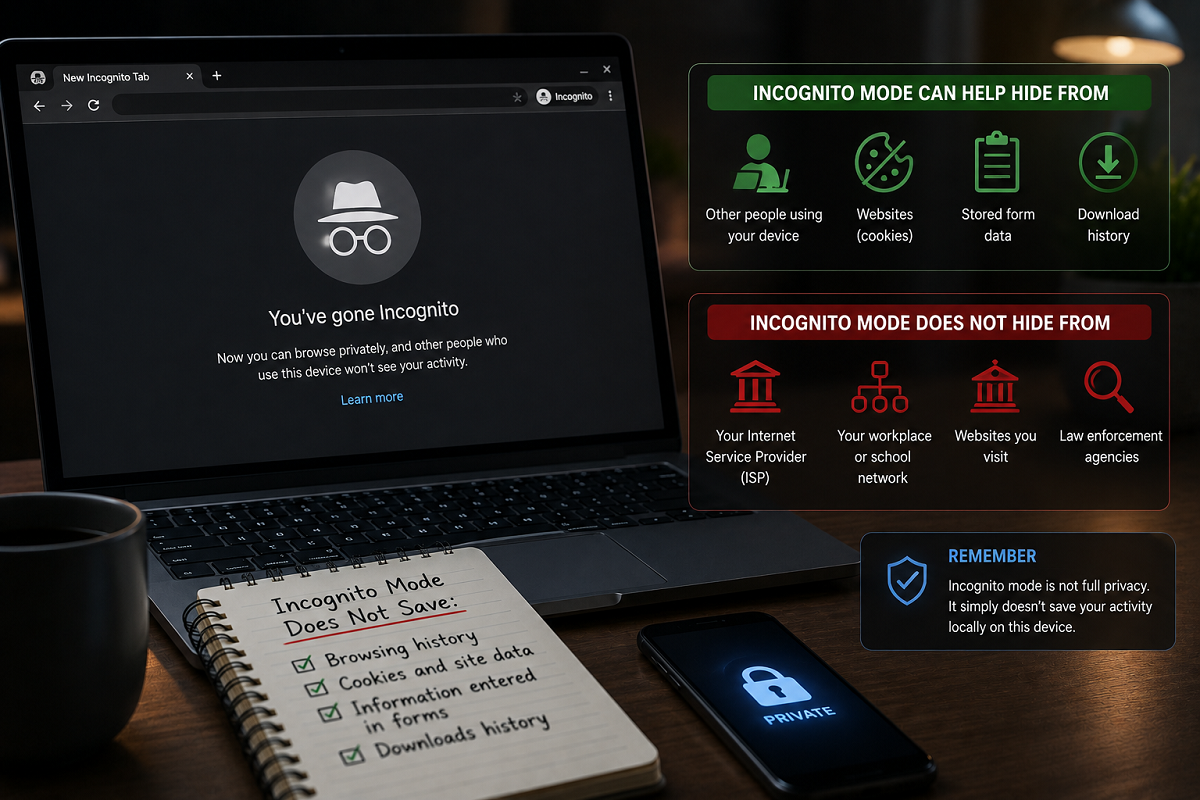
Incognito Mode can prevent your browser from keeping some local browsing data after you close the session, but it does not make you invisible online. Websites, network operators and other services may still receive information about your activity.
Incognito Mode is one of the most widely used browser features, but it is also frequently misunderstood. Many users assume that opening an Incognito window makes everything they do on the internet completely private and impossible to track.
That is not how it works.
Private browsing is primarily designed to limit what remains stored in your browser after a private session ends. It can be useful when you are using a shared computer, signing into an account temporarily or simply don't want a browsing session to appear in the device's normal browser history.
However, Incognito Mode does not automatically hide your identity, IP address or internet traffic from every other party involved in your connection.
Understanding this difference is essential before treating private browsing as a complete online privacy solution.
What Exactly Is Incognito Mode?
“Incognito Mode” is the name used by Google Chrome for its private browsing feature. Other browsers provide similar functionality under different names. Mozilla Firefox, for example, calls it Private Browsing, while Apple's Safari offers Private Browsing windows.
The basic objective is broadly similar: create a temporary browsing session that stores less information locally than a standard browser session.
When you close all private browsing windows, the browser generally does not retain the visited-page history and certain site data from that session in the same way it would during normal browsing.
This means another person who later opens the browser on the same device may not see those websites listed in the regular browsing history.
But that protection has limits.
Does Incognito Mode Save Browsing History?
Incognito Mode generally prevents the browser from adding pages visited during that private session to its regular local browsing history.
Cookies and site data created during the session are also generally removed when all Incognito windows are closed.
That makes the feature particularly useful on shared devices.
Suppose you need to log into your email account briefly on a family computer. A private window can reduce the amount of session data left behind after you sign out and close it.
However, files you intentionally download and bookmarks you create can remain on the device after the private session ends.
Private browsing should therefore not be confused with a feature that erases everything you do on a computer.
Can Your Internet Provider See Your Activity?
Incognito Mode does not prevent your internet connection from passing through your Internet Service Provider (ISP).
The exact information an ISP can observe depends on factors such as encryption, network configuration and the technologies being used. Modern HTTPS encryption can protect the contents of communications between your browser and a website from being read in transit, but Incognito Mode itself does not provide this encryption or make your network connection anonymous.
In other words, switching from a normal browser window to an Incognito window does not suddenly hide your internet connection from your ISP.
What About Office or School Wi-Fi?
Private browsing also does not bypass network-level monitoring.
If you are using a workplace, school, university or another managed network, administrators may have security and monitoring systems operating independently of your browser's history.
Incognito Mode does not disable those systems.
This is particularly important on devices supplied or managed by an employer or educational institution. Such devices may contain management or security software capable of recording activity regardless of whether the browser is operating in private mode.
You should therefore never assume that Incognito Mode makes activity invisible to the organisation controlling a device or network.
Can Websites Still Identify You?
Websites can still receive information about visitors using private browsing.
For example, your public IP address is not automatically hidden simply because you opened an Incognito window. Websites may also receive technical information necessary to provide their services.
More importantly, if you sign into an account, the service can generally associate actions performed while logged in with that account.
Imagine opening an Incognito window and then signing into your Google, social-media or shopping account. Private browsing may prevent that session from appearing in the browser's regular history afterward, but it does not make you anonymous to the service you voluntarily logged into.
This is one of the biggest misconceptions surrounding private browsing.
Does Incognito Mode Hide Your Location?
Not necessarily.
Your approximate location may sometimes be inferred from your IP address. Websites can also request access to more precise location information through browser permissions.
Incognito Mode does not automatically change your IP address or guarantee that websites cannot determine an approximate location.
If you give a website permission to access location services during the session, private browsing does not magically override that permission for the duration of your interaction.
Does Incognito Protect You From Hackers?
No. Incognito Mode is not antivirus software or a cybersecurity shield.
A malicious website remains malicious whether you visit it in a normal window or a private one. Phishing pages can still attempt to steal passwords, fraudulent downloads can still contain malware and scams can still trick users into sharing financial information.
Incognito Mode also cannot make a dangerous file safe.
Basic cybersecurity precautions remain essential: keep your browser and operating system updated, avoid suspicious downloads, use unique passwords and enable multi-factor authentication on important accounts.
When Is Incognito Mode Actually Useful?
Private browsing is useful when you understand what it is designed to do.
It can be convenient when temporarily signing into an account on a shared device, browsing without adding pages to the regular browser history or keeping cookies from a private session separate from your main browsing session.
It can also be helpful when testing websites without using existing login cookies or when you want to open another temporary session without signing out of your regular browser profile.
These are practical privacy and convenience benefits—but they are primarily related to what the browser retains locally.
Incognito Does Not Mean Invisible
The simplest way to understand Incognito Mode is to separate local privacy from online anonymity.
Private browsing can reduce traces left in the browser on the device after the session is closed. It does not automatically conceal your activity from websites, organisations controlling your network, internet providers or services you sign into.
It also does not hide your IP address, block malware, prevent phishing or guarantee that nobody can track your activity.
So the next time you see the Incognito symbol, remember: private browsing can help keep a browsing session out of your regular local history, but it is not an invisibility cloak for the internet.